


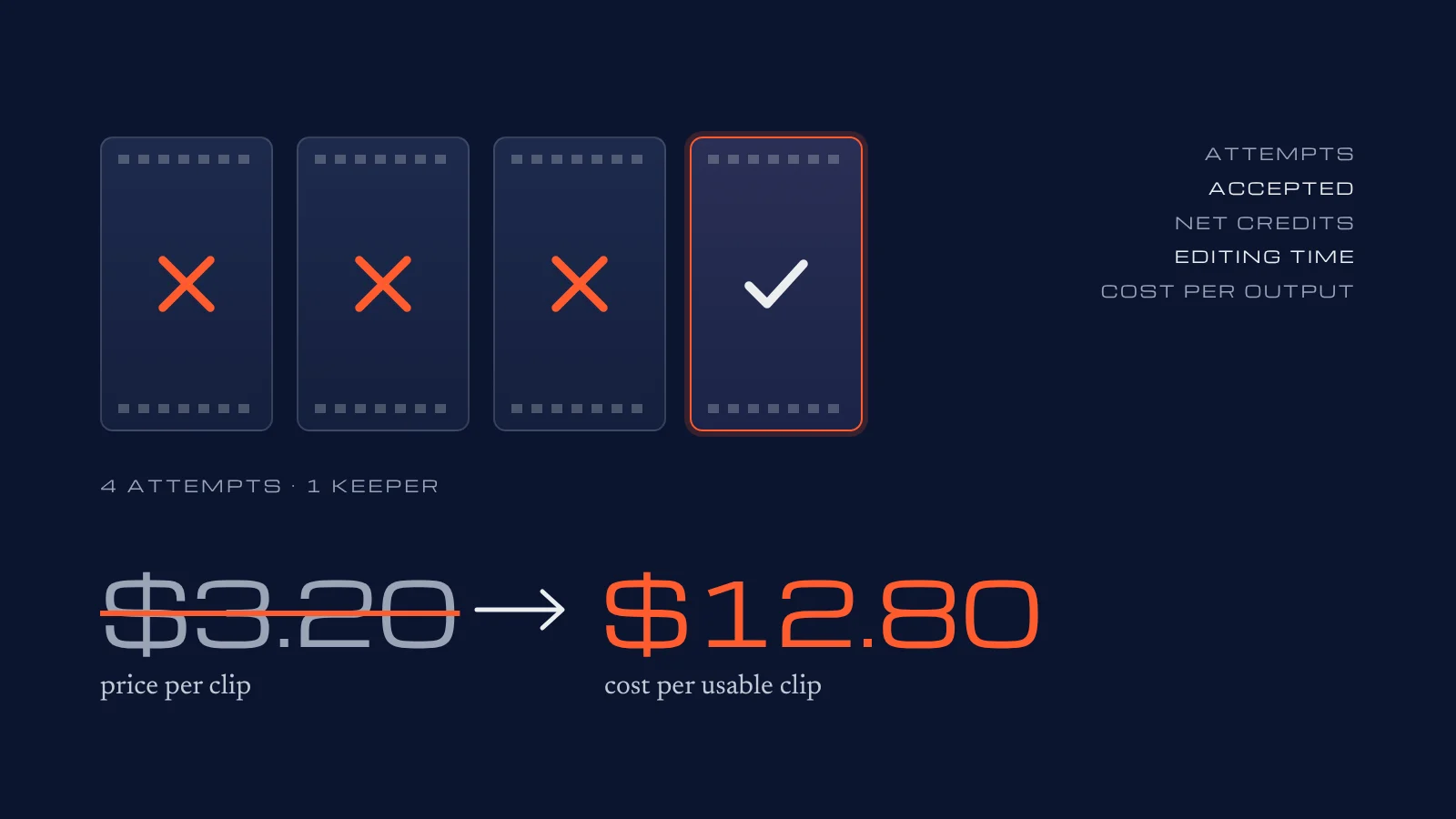
Every AI generator advertises a price per attempt: so many credits per image, so many cents per second of video. Nobody posts the attempt, though. You post the one that worked, and you paid for the ones that didn’t.
That gap is the real cost of AI content, and most creators never measure it. This guide shows how to work out what a usable image or clip actually costs once failed generations and editing time are counted, with examples at current prices.
The price you see is per attempt
Here is what one attempt costs on the models AI creators use most, checked on November 21, 2026, across more than a dozen places to run them: the model makers’ own APIs; the API platforms WaveSpeed, fal, Replicate, kie.ai, Segmind and Atlas Cloud; and the creator apps Higgsfield, Magnific (formerly Freepik), Krea, OpenArt, the Kling app, Dreamina and Google Flow. The tables show the lowest and highest price we found for each model. Creator apps charge in credits, so we converted credits to dollars at every plan and top-up price we list for each app, including standard yearly prices. First-year discounts, sale prices and prices quoted for a different resolution or mode are left out.
| Model and setting | Lowest we found | Highest we found | Platforms compared |
|---|---|---|---|
| Veo 3.1, 8 s, 1080p, with sound | $1.00 (Google Flow, AI Ultra plan, until December 5) | $6.40 (Higgsfield top-up pack) | 7 |
| Veo 3.1 Fast, 8 s, 1080p, with sound | $0.10 (Google Flow, AI Ultra plan, until December 5) | $2.56 (Higgsfield top-up pack) | 7 |
| Seedance 2.5, 5 s, 1080p | about $2.61 (Magnific Pro plan, billed yearly) | $6.40 (Higgsfield top-up pack) | 7 |
| Seedance 2.5, 5 s, 720p | $1.155 (Higgsfield Ultra 3K plan, billed yearly) | $2.80 (Higgsfield top-up pack) | 9 |
| Kling 4.0, 5 s, 1080p | $0.62 (Higgsfield Ultra 3K plan, billed yearly) | $3.15 (OpenArt Starter plan) | 8 |
| Kling 3.0 Pro, 5 s, 1080p, no sound | $0.434 (Kling app, Pro plan) | $1.12 (Replicate) | 7 |
| Kling 3.0 Pro, 5 s, 1080p, with sound | $0.33 (Higgsfield Ultra 3K plan, billed yearly) | $1.68 (Replicate) | 7 |
| Wan 3.0, 5 s, 1080p | $0.90 (OpenArt Wonder plan, monthly) | $2.20 (Higgsfield top-up pack) | 5 |
| Grok Imagine Video 1.5, 5 s, 1080p | $1.25 (xAI) | $3.20 (Higgsfield top-up pack) | 4 |
| MiniMax H3, 5 s, 2K | $0.33 (Higgsfield Ultra 3K plan, billed yearly) | $0.812 (Segmind) | 4 |
| Model and setting | Lowest we found | Highest we found | Platforms compared |
|---|---|---|---|
| Nano Banana Pro, 2K | $0.066 (Higgsfield Ultra 3K plan, billed yearly) | $0.16 (Higgsfield top-up pack) | 7 |
| Nano Banana 2, 1K | from $0.04 (kie.ai) | $0.12 (Higgsfield top-up pack) | 6 |
| Nano Banana 2.1, 1K | from $0.02 (kie.ai) | $0.12 (Higgsfield top-up pack) | 5 |
| GPT Image 2.5, 1K, high quality | from $0.03 (kie.ai) | $0.12 (Higgsfield top-up pack) | 2 |
| Seedream 5.0 Pro, 2K | from $0.041 (WaveSpeed) | $0.20 (Higgsfield top-up pack) | 3 |
| Seedream 5.0 Lite, standard | from $0.028 (kie.ai) | $0.08 (Higgsfield top-up pack) | 3 |
| Grok Imagine Image 2.0, 1K, medium | from $0.02 (kie.ai) | $0.16 (Higgsfield top-up pack) | 3 |
| Kling Image 4.0, 2K | from $0.063 (WaveSpeed) | $0.16 (Higgsfield top-up pack) | 2 |
| MiniMax H3 Image, 2K | from $0.02 (WaveSpeed) | $0.24 (Higgsfield top-up pack) | 3 |
| FLUX 3 Image, 2K | $0.099 (Higgsfield Ultra 3K plan, billed yearly) | $0.24 (Higgsfield top-up pack) | 1 |
| Stable Diffusion 3.5 Large, standard | $0.065 (Stability AI) | – | 1 |
| Stable Diffusion 3.5 Medium, standard | $0.035 (Stability AI) | – | 1 |
| Midjourney, one 4-image grid, fast mode | about $0.033 (Midjourney) | – | 1 |
“From” marks a platform’s starting price for its lowest setting, which can be below the setting in the row. ByteDance bills Seedance 2.5 by the token, so its figures are estimates; OpenAI does the same for GPT Image 2.5, and Black Forest Labs prices FLUX 3 by resolution tier. Some app credit costs come from independent pricing write-ups, because the apps show exact costs only after you log in. Prices change often and platforms run regular discounts, so treat the tables as a snapshot. The full platform-by-platform list for every model is in our AI content cost calculator.
The Google Flow prices for Veo 3.1 and Veo 3.1 Fast apply only until December 5, 2026, when Google retires both models in Flow. The Google API, WaveSpeed, Replicate and the creator apps aren’t affected by that change.
Leonardo and Hedra are missing for the same reason: neither publishes what these models cost in credits, so there’s nothing fair to compare yet.
Two popular tools don’t fit a per-attempt table at all. Midjourney sells subscriptions measured in GPU time: Basic is $10 a month for about 3.3 hours of fast generation, Standard is $30 for 15 hours, and a standard four-image prompt uses roughly one GPU minute. A rejected grid still uses that minute. Stable Diffusion is open, so you can run it on your own computer for the cost of the hardware and power, or pay Stability AI per image as in the table. Run locally, a failed generation costs you time rather than money, which is still a cost.
Every one of these prices is per attempt. The question that decides your costs is different: for every ten usable images or clips you finish, how many generations did you run, how many credits did you spend, and how long did you spend editing?
Most creators don’t know. The evidence suggests the answer is “more than they think.” In an Adobe survey of more than 16,000 creators in eight countries (fielded by The Harris Poll in May 2026), 57% said their AI outputs typically need moderate or extensive editing before they’re ready to share. A second Adobe survey of more than 2,000 U.S. creators, fielded in October 2026, found that 68% of creative AI users at least sometimes accept a result that doesn’t quite match what they had in mind, and 47% had abandoned AI partway through a project in the previous three months because getting the result they wanted took too much effort.
The same model costs different amounts on different platforms
The tables show something creators rarely check: where you run a model can matter as much as which model you pick. An eight-second Veo 3.1 clip with sound costs $3.20 from Google, WaveSpeed or Replicate, about $3.06 on OpenArt’s Plus plan, $3.92 on Higgsfield’s Plus plan and $6.40 with Higgsfield top-up credits. Inside Google Flow it takes 100 credits, which works out to about $2.00 on the AI Pro plan and $1.00 on AI Ultra if you use the whole monthly allowance. Those Flow prices have an end date: Google retires Veo 3.1 Fast and Veo 3.1 Quality in Flow on December 5, 2026, so after that the cheapest Veo route there changes. A five-second Seedance 2.5 clip at 720p costs about $1.16 at BytePlus or Replicate, slightly less on Higgsfield’s Ultra 3K plan billed yearly, and $2.80 with Higgsfield top-up credits. Resellers aren’t always cheaper than the source, either: Veo 3.1 Fast costs $0.96 from Google and $1.20 on WaveSpeed or Replicate.
Subscription prices per credit assume you use every credit you pay for. Credits that expire unused raise your real price, and unlimited periods or discounts on some plans lower it.
That doesn’t make the app the wrong choice. Creator apps bundle things the raw APIs don’t: a browser interface, saved characters, presets, many models under one balance, and plan deals that bring the credit price down. The API platforms are cheaper per attempt but expect you to work through code or a bare playground.
Unlimited plans and prepaid packs
Unlimited sounds like the end of this problem, since a failed attempt costs nothing. In practice it is narrower than the word. On November 21, 2026, everything Higgsfield sold as unlimited was an image model: its Ultra plan includes unlimited use of eight image models for seven days, and separate packs cover nine image models for one, three or seven days at regular prices of $15, $45 and $105, two images at a time. For video, Higgsfield sells Bonus Seconds instead, a prepaid pool such as 240 seconds of Seedance 2.5 at 720p for $92 that expires 72 hours after purchase. A failed clip uses up seconds the same way it uses up credits.
Other apps draw the line in different places. Artlist’s AI Core and AI Creator plans, at $23.99 and $41.67 a month billed yearly, include unlimited generations on 8 and 18 models, but only on yearly billing, and the video models are capped at 480p on Core and at 720p to 1080p and 4 to 6 seconds on Creator (Artlist). Magnific, formerly Freepik, moved several popular image models, including Nano Banana Pro and GPT Image 1.5, from unlimited back to credits (Freepik). Its current Plus and Pro plans include a Relax mode that runs Nano Banana 2 images and Kling 2.5 clips at 720p without using credits (Magnific). Unlimited generations also run in a slower shared queue on all of these, so they cost time when they don’t cost credits.
The test is a single division: the pack’s price by what one attempt costs you on credits. The answer is how many generations you need in the period, failed ones included, before the pack is cheaper. Higgsfield’s 1-day pack at $15 beats top-up credits after 94 Nano Banana Pro images, and the Plus plan’s credit price after 154. A creator who makes 40 images on a busy day is better off paying per attempt. The calculator’s unlimited check does this sum for each plan and shows the cost per usable output at your hit rate.
The point is to know your real credit price. Divide what you paid by the credits you got, and use that number, not the plan name, in everything that follows. A creator who generates a few clips a week may never notice the difference. A creator running dozens of attempts a day to keep an AI influencer consistent will, because every failed attempt is charged at that rate too.
What the platforms refund, and what they don’t
A failed generation can mean two things, and generators treat them differently.
A technical failure is when the job errors out and nothing comes back. Most platforms return those credits. Runway says credits are returned automatically when a generation “ends in a generation error,” usually within a few minutes. Higgsfield says credits for failed generations usually come back automatically, with one exception: Grok generations are charged as soon as they start. Kling’s credits policy, as quoted by Higgsfield’s comparison of the three, says it deducts credits when a generation starts and refunds them if the generation fails. WaveSpeed says it bills per successful generation.
A creative failure is a clip that rendered fine but is no use to you: the hands are wrong, the face drifted, the movement looks strange. Nobody refunds those. Runway is explicit that once a generation completes, “credits are consumed and cannot be automatically reinstated,” even when the result misses the prompt.
Creative failures are most of the waste, and they’re the part you pay for in full. They’re also the part you can reduce, because they usually trace back to the brief, the references or the model choice rather than to bad luck.
One bookkeeping rule follows from this. Count a credit as returned only once it’s back in your balance. A refund you expect is not a refund.
Work out cost per usable output
The number to track is cost per accepted output. It takes five figures from each batch of generations made for one creative task:
| Number | What it means |
|---|---|
| Attempts | Every generation you ran for the batch, including failed and abandoned ones |
| Accepted | Outputs that pass the quality bar you set before you started |
| Net credits | Credits spent, minus credits actually returned to your balance |
| Editing time | Minutes spent on prompts, choosing, retouching, fixing and exporting |
| Other costs | Anything else paid for this batch, such as a separate upscaler or voice tool |
Then:
Cost per accepted output = (net credits × price per credit + editing minutes ÷ 60 × your hourly rate + other costs) ÷ accepted outputs
Our AI content cost calculator does this sum for you, with the prices below already filled in for each model and platform.
Price per credit is what you paid for a credit pack or plan divided by the credits it gave you. If $60 bought 3,000 credits, each credit costs $0.02. If you’re on a plan with unlimited generations, there’s no per-credit price, so set aside a share of the monthly fee for the batch instead, and don’t also count the subscription a second time.
Your hourly rate is what an hour of your time is worth to you. If you’d rather leave your time out, use zero, but use the same choice every time so batches stay comparable.
Before you generate anything, write down what “accepted” means for this batch. A draft image you’ll keep editing and a client-ready campaign asset aren’t the same unit, and a result that looks better only because you quietly lowered the bar halfway through isn’t an improvement.
What the hit rate does to the price
Yield is the share of attempts you accept. It multiplies everything. If you keep one attempt in four, every usable output costs four times the posted price before you’ve spent a minute editing.
| Output | Price per attempt | Keep 1 in 2 | Keep 1 in 4 | Keep 1 in 10 |
|---|---|---|---|---|
| Veo 3.1, 8 s with sound (Google, pay per clip) | $3.20 | $6.40 | $12.80 | $32.00 |
| Seedance 2.5, 5 s, 1080p (BytePlus, estimate) | $2.85 | $5.70 | $11.40 | $28.50 |
| Kling 4.0, 5 s, 1080p (kie.ai) | $1.06 | $2.12 | $4.25 | $10.62 |
| Wan 3.0, 5 s, 1080p (Alibaba Cloud) | $1.00 | $2.00 | $4.00 | $10.00 |
| Kling 3.0 Pro, 5 s, with sound (Kling) | $0.84 | $1.68 | $3.36 | $8.40 |
| Nano Banana Pro, 2K (Google) | $0.134 | $0.268 | $0.536 | $1.34 |
| Seedream 5.0 Pro, 2K (BytePlus) | $0.09 | $0.18 | $0.36 | $0.90 |
| Nano Banana 2.1, 1K (Google) | $0.034 | $0.068 | $0.136 | $0.34 |
The hit rates are examples, not measurements. Nobody publishes reliable figures for how many attempts creators keep, and yours depends on the model, the subject and how strict you are. Put your own price per credit and your own hit rate into the formula.
For video, the multiplier hurts most. A clip with good motion is harder to get than a good still, a rejected clip costs dollars rather than cents, and a generated second isn’t a usable second: you may trim half of a clip you keep.
Editing usually costs more than generating
Generation credits are the part of the cost that shows up on a statement, so they get the attention. For still images, editing time is usually the bigger number. Twenty minutes of choosing and retouching, valued at $25 an hour, is $8.33. That’s more than sixty Nano Banana Pro attempts.
Editing covers more than retouching. Count the time spent comparing candidates and rejecting weak ones, fixing hands, faces and backgrounds, color, sound, titles and export, reworking anything that didn’t meet the standard, and checking sizes, timing and files before delivery.
Here’s how it plays out. The two batches below are invented to show the arithmetic, using the same $0.02 credit price and $25 an hour for editing time. Batch A was generated from loose prompts; Batch B from a written brief with prepared references.
| Figure | Batch A: loose prompts | Batch B: written brief |
|---|---|---|
| Attempts | 28 | 18 |
| Accepted | 7 | 9 |
| Yield | 25% | 50% |
| Net credits | 700 ($14.00) | 540 ($10.80) |
| Editing time | 80 minutes ($33.33) | 60 minutes ($25.00) |
| Other costs | $0 | $6.00 |
| Total | $47.33 | $41.80 |
| Cost per accepted image | $6.76 | $4.64 |
Batch B cost less per usable image even with $6 of extra spending, because it produced more keepers from fewer attempts and needed less fixing. In both batches, generation was under a third of the total. The rest was time.
The example doesn’t show that briefs always win. It shows where to look: when cost per output falls, find out what changed in the brief, the references or the review, so you can repeat it.
Find out why attempts fail
A cost figure is only useful if it changes the next batch. For each batch, write down the main reason outputs were rejected, then test one fix.
| Main reason | Next test |
|---|---|
| Output doesn’t match the idea | Write a one-paragraph brief and a short list of things to avoid |
| Influencer’s face or body drifts | Keep identity references separate from wardrobe and camera instructions |
| Strange motion in video | Ask for simpler movement, or test with a shorter draft clip first |
| Wrong lighting | Fix light direction and time of day in the prompt before rerunning |
| Bad audio | Test the audio on its own before paying for a full video re-render |
| Too many variants | Decide whether the extras were exploration or needed for the job |
Change one thing at a time. If you switch the prompt, the references, the model and the duration together, the next batch may be better and you won’t know why.
For AI influencers, drift is often the expensive one. A clip where the face changes halfway is unusable however good the rest is, and it’s the failure most likely to repeat until the references are fixed.
Decide when to stop before you start
Credits disappear fastest when every bad result triggers another attempt. A retry budget turns that into a decision.
Before a batch, write down what you need (one usable shot, one thumbnail, one approved sequence), the most you’ll spend on it in credits or dollars, and a checkpoint. A reasonable checkpoint is three failures for the same reason. At that point, stop and look at what went wrong before paying for another run. Then continue, change the brief, switch tools, or stop, and note which.
Three is a working number, not a rule. A paid campaign can justify more attempts than a casual post. What matters is that the decision is yours rather than the next click’s.
Compare tools on finished output
The cheapest model per second isn’t always the cheapest per usable clip. A tool with low prices and weak motion can cost more once you count the attempts it takes and the time you spend repairing what it gives you.
To compare two tools fairly, give both the same job, the same quality bar, the same output format and a similar number of attempts, judged by the same person. Log every attempt, include editing time on both sides, and compare cost per accepted output. Prefer the cheaper workflow only if the outputs meet the same standard and the difference holds across more than one batch. One batch is an observation, not a benchmark.
Use the number when you price a job
Once you know your cost per output, you can check a quote before you send it. If you’re asked for five finished images and your records say each costs about $12 to produce, the base is $60. Add an allowance for revisions, say 15%, and the expected cost is $69. For a 50% gross margin, the minimum price is $69 ÷ (1 − 0.5), or $138. A quote of $150 leaves about 54%.
That minimum covers production only. Payment fees, tax, marketing and your other running costs come on top, and it says nothing about what buyers in your market will pay.
You don’t need a year of records to start. Log one real batch this week: attempts, accepted outputs, credits used and returned, editing minutes, and the main reason for rejects. That gives you a first cost per output, and the calculator shows how it compares across platforms. Change one thing, run a comparable batch, and compare. If the cost drops for the same quality, keep the change.
Prices in this guide were checked on November 19 and 20, 2026. Higgsfield credit costs come from Higgsfield’s own cost quotes for each setting on that date; Higgsfield plan prices and the unlimited plans and packs were checked on November 21, 2026. Prices change often, so check your own plan’s price per credit before relying on any figure here.
Calculate your own cost per usable output
Free monthly email
Get the monthly price changes
Prices on these platforms move every week, and the new ones are rarely announced. Once a month we’ll email you what changed and where each model is cheapest to run, so you don’t find out after you’ve already paid more than you had to.
Sources
- Google Cloud, Vertex AI generative AI pricing (Veo 3.1 and Gemini image models)
- Adobe, Creators’ Toolkit Report 2026 (June 16, 2026)
- Adobe, “From big ideas to bigger opportunities” (November 9, 2026)
- WaveSpeed, pricing
- WaveSpeed, Veo 3.1 text-to-video model page
- WaveSpeed, Seedance 2.5 vs Wan 3.0 vs Kling 4.0 (October 24, 2026)
- WaveSpeed, Grok Imagine Video 1.5 (billing per successful generation)
- fal, Kling 4.0 vs Seedance 2.5 (November 4, 2026)
- fal, Nano Banana vs Seedream
- xAI, API pricing (Grok Imagine image and video)
- Alibaba Cloud Model Studio, Wan3.0 video
- OpenAI, GPT Image 2.5 model page
- Black Forest Labs, API pricing
- Puter, Stability AI API pricing breakdown (June 2026)
- eesel AI, Midjourney pricing in 2026 (June 5, 2026)
- AI Funnel Insider, Higgsfield Pricing 2026 (plan prices dated November 18, 2026)
- Artlist, AI pricing: plans, credits and Unlimited models (November 5, 2026)
- Freepik, What’s changing in Unlimited
- Oakgen, Best Unlimited AI Video Generators in 2026 (Magnific and Midjourney plan details, checked September 20, 2026)
- Segmind, Higgsfield credits explained (plan prices captured August 5, 2026)
- UberLLM on DEV, Seedance, Kling and Veo 3.1 API prices across 6 sellers (November 20, 2026; the author runs one of the sellers)
- Developers Digest, image and video generation API pricing across 19 providers (October 18, 2026)
- kie.ai, pricing
- Atlas Cloud, Kling 4.0 model page
- Atlas Cloud, Seedream 5.0 Pro price (official BytePlus tiers)
- Magnific (formerly Freepik), Pricing and plan comparison
- Magnific, Plans and pricing
- WaveSpeed, Krea AI pricing 2026 (November 18, 2026)
- Voyager, OpenArt pricing and credits per model (October 20, 2026)
- FrameSurfer, Kling AI app plans and credits (October 13, 2026)
- Dreamina, plans and credits (November 13, 2026)
- Dreamina, Seedance 2.5 credits per second
- SaaS CRM Review, Google Flow plans and credits (November 7, 2026)
- Runway Help Center, Can I have credits refunded?
- Higgsfield Creator Hub, Generation is stuck or failed
- Higgsfield, Failed generations and credit refunds compared (quotes Kling’s credits policy)